

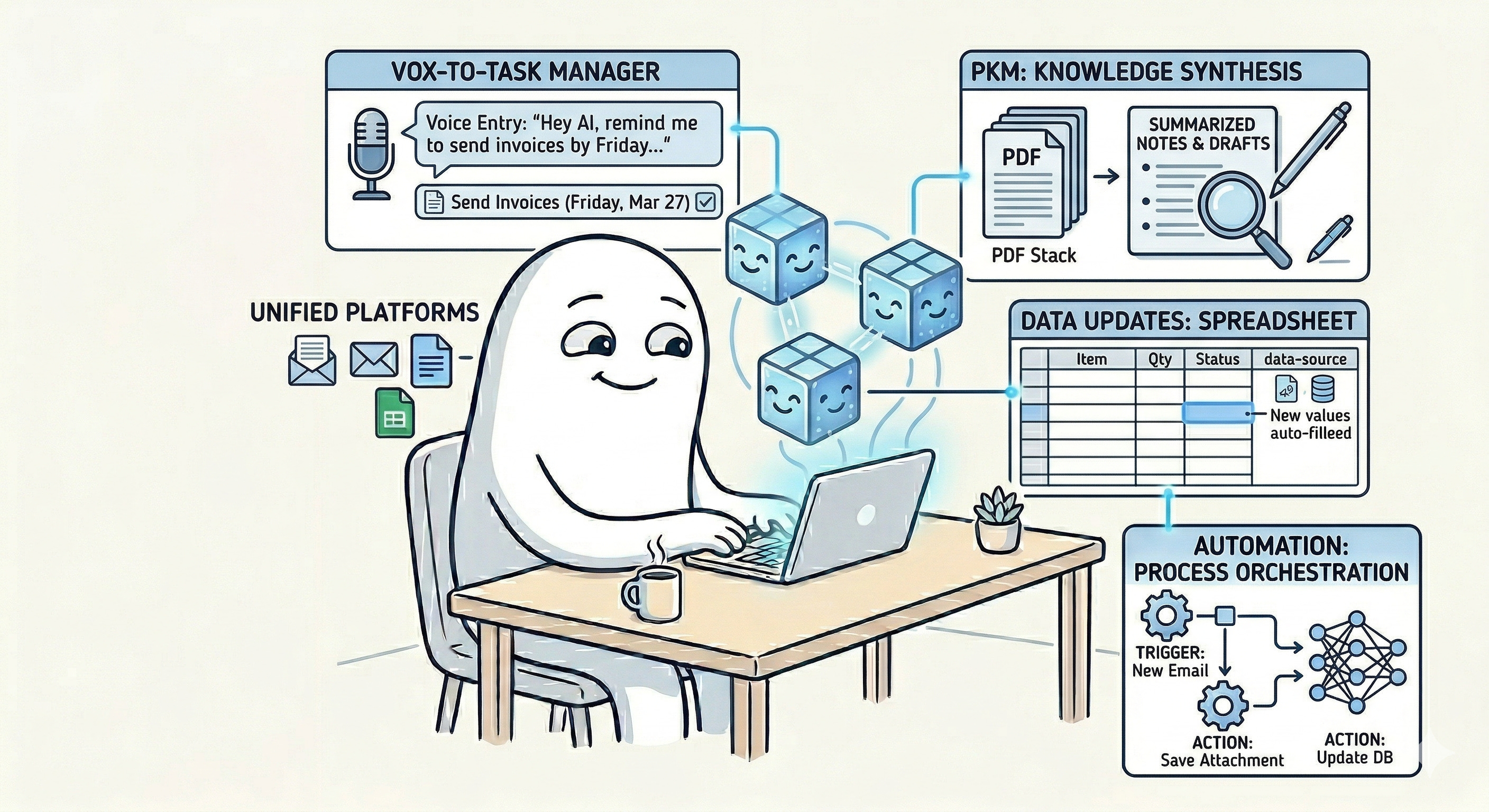
Artificial intelligence is steadily moving from being a single tool you open on demand to becoming a growing collection of tools, systems, assistants, and semi-autonomous agents that can help you get work done across your personal and professional life.
Up to this point in this series, I have written about several distinct ways AI is already changing personal productivity. I discussed AI as an assistant that helps reduce administrative friction and shadow work. I explored AI as an assistant, researcher, learning partner, and coach. Then I looked at how AI is being embedded inside the tools we already use, and how AI coding companions are lowering the barrier to building bespoke tools and workflows for ourselves. The next question is what happens when all of those capabilities begin to accumulate around us. What happens when you are not using one AI tool, but many? What happens when one system is helping you research, another is helping you write, another is building slides, another is generating diagrams, another is producing audio, and yet another is browsing the web or carrying out multi-step digital tasks on your behalf?
At that point, the productivity challenge changes. The issue is no longer simply whether AI can help with a task. The new challenge becomes whether you can coordinate a growing virtual workforce of AI systems well enough that they actually improve your productivity rather than increase your confusion. That is where I think many of us are headed.
A great deal of the current conversation around so-called agentic AI implies that we are on the verge of delegating work to a highly capable digital worker who will simply take instructions and return completed outcomes with minimal oversight. I think that framing is often too simplistic. In practice, what most people will encounter first is not one magical autonomous agent, but a disaggregated ecosystem of many different AI tools with different strengths, interfaces, permissions, risks, and limitations. You may use ChatGPT, Claude, or Gemini as conversational thinking partners. You may use NotebookLM to synthesize source materials. You may use tools like Napkin.ai to create diagrams, ElevenLabs to create voice output, or AI features embedded in Microsoft 365 or Google Workspace to transform content where your work already lives. You may also begin experimenting with agentic browsers, coding agents, and orchestration tools that can carry out increasingly complex digital tasks.
That future does not reduce the need for human management. It increases it. If anything, I think the next major skill in personal productivity will not simply be prompting, but coordinating. We will need to become better at selecting the right tools, defining their roles, setting permissions and boundaries, auditing their work, maintaining their usefulness over time, and knowing when to step in because the system is no longer behaving in a trustworthy or productive way. In other words, many of us are going to need to become managers of a virtual, personal workforce.
That requires a different mindset because this is not merely a technology story; this is also a management story. Just as I argued in my prior article that it is increasingly important to learn programming fundamentals so that we better understand the structure of software, I think it is becoming increasingly important to learn some basic management fundamentals so that we can direct AI systems more effectively. You do not need to become a corporate executive, and you do not need to run a large team. But if you want to work effectively with multiple AI systems, you do need to understand something about role clarity, delegation, feedback, boundaries, review cadences, and performance improvement.
That is what this article is about. I want to offer a framework for thinking about how to set up, orchestrate, maintain, troubleshoot, and improve a virtual AI workforce for your personal productivity. Much of this can also extend into your work life, but I want to keep the focus here on the personal side of the equation, because that is often where experimentation starts and where many of us first develop the habits that later shape how we work professionally.
The First Mistake: Thinking Agentic AI Will Simply “Do the Work”
One of the most common misconceptions people have about AI coordination is the belief that they will install a tool, give it a goal, and it will more or less complete the work with full volition and minimal supervision. That is an understandable assumption given the way many of these tools are marketed, but I think it is often unrealistic. What most people discover very quickly is that delegation to AI requires far more preparation than they expected.
You need to write or articulate specifications. You need to explain what success looks like. You need to clarify what the tool should do, what it should not do, and how it should make decisions when conditions change. You often need to connect multiple systems together. You need to grant permissions, manage credentials, and determine the boundaries of access. Those boundaries matter because AI systems can only operate in the digital environments to which they have access. Even when they can trigger real-world services, such as arranging transportation, ordering food, or making purchases, they are still only acting through digital systems. That means authentication, authorization, permissions, payment limits, and security controls become part of the productivity conversation.
If a human employee needs credentials, training, and guardrails before you trust them with certain kinds of work, why would you expect anything different from a digital worker? This is one reason I think management is the right analogy. If you hire a new employee, you do not simply say, “Go do whatever seems best,” and then disappear. A competent manager assesses what that employee can actually do, defines the scope of the role, explains standards, gives them access to the systems they need, and limits their authority where appropriate. They do not hand over the bank account, the master passwords, and the company credit card without process or oversight.
The same principle applies here. In that sense, the arrival of AI agents does not eliminate management. It makes management newly personal. For years, many people have been individual contributors who did not need to think of themselves as managers because they did not supervise other people. But if you begin to coordinate multiple AI systems around your work, you are managing. You are assigning tasks, monitoring output, creating feedback loops, and improving performance over time. That role deserves to be taken seriously.
Start With Roles, Boundaries, and a Tool Selection Logic
If the goal is to manage a virtual workforce effectively, then one of the first steps is deciding who does what. That sounds obvious, but it is where many people begin to lose the thread. They accumulate tools because each tool appears impressive in isolation. One creates slides. Another produces diagrams. Another summarizes documents. Another researches. Another codes. Another browses. Another automates. Another integrates into email, notes, spreadsheets, or calendar systems. Before long, the user has a shelf full of AI capabilities but no coherent logic for when each one should be used.
This creates friction instead of reducing it. The first problem is tool selection. What is the best tool for the job? The second problem follows immediately after. Once you choose a tool, how do you use it well enough to get the right outcome? And the third problem is orchestration. How do you centralize your instructions and decision-making so that your growing collection of tools does not become a chaotic assortment of disconnected experiments?
I think this is where people need some kind of control center. That control center does not have to look the same for everyone. For some people, it may be a dashboard. For others, it may be a custom GPT, Gemini Gem, Claude Project, or another master AI assistant that functions like a chief of staff. For others, it may be a flowchart, a decision tree, or a structured checklist that helps them determine which tool should handle which type of work. The format matters less than the function.
You need a repeatable way to answer questions like these:
Is this a research task, a writing task, a diagram task, a voice task, a planning task, or a coding task?
Does this work belong inside one of my existing platforms, such as Google Workspace, Microsoft 365, Evernote, or my task manager?
Does this require a conversational model, a source-grounded model, a design tool, or an autonomous agent?
Does this task require internet access, file access, financial access, or other sensitive permissions?
Is the goal simply to generate a work product, or to carry out a sequence of actions?
When you can answer those questions quickly, you reduce decision fatigue and increase consistency. I can imagine many readers creating a kind of “AI routing” prompt or flowchart for themselves. You describe the work that needs to be done, and the system helps direct you toward the right tool or combination of tools. That could be as simple as a one-page decision tree or as advanced as a chief-of-staff assistant that interviews you about your needs and then recommends a workflow. Either way, the principle is the same. Before you can coordinate well, you need role clarity. In management terms, that means defining which tool is responsible for what, under which conditions, and with which limitations.
This also helps reduce a subtle but growing problem in the AI era: redundant overlap. When three different tools can each perform 70% of the same task, the temptation is to keep experimenting indefinitely. Sometimes that is useful. Often it is just another form of procrastination. A well-managed AI workforce does not require the newest tool for every possible category of work. It requires a coherent set of tools that you understand well enough to use with confidence.
Build Your AI Control Center Around Your Actual Workflow
Once roles are defined, the next challenge is orchestration. How do you actually keep these systems coordinated? I do not think there is a single correct answer, because different people work differently and have different tolerances for complexity. But I do think most people will need some practical way to centralize how they direct this growing AI ecosystem.
For some, the best answer may be a lightweight dashboard or launchpad that lists their core AI tools by role and links directly to each one. That kind of system reduces friction by making the workforce visible and accessible. For others, the better answer may be process rather than interface. You might use a project management tool, notes application, or digital workspace as a kind of AI operations board. You track which tools are involved in which workflows, where outputs live, which prompts or templates you use regularly, and where human review needs to happen. In that model, the coordination layer lives inside your broader system rather than as a separate dashboard.
For others still, the most useful control center may be a conversational one. You create or configure a master assistant that acts as a tool chooser or chief of staff. You explain the outcome you want, and it helps decide which tools should be involved, in what order, and what instructions should be given to each. I find that model especially interesting because it mirrors what good coordination often looks like in human organizations. A strong chief of staff does not do all the work personally. Instead, they help direct the right work to the right people, gather the outputs, and keep the system aligned with the larger objective.
There is also a simpler option that should not be overlooked, and that is routines. Some people may not need a sophisticated interface at all. You may simply need a habit of asking, before you begin a task, “Which AI system is best suited for this?” and “Where should this work live when it is done?” Over time, that kind of automatic behavior creates its own operational discipline.
Whatever the structure, the deeper issue is that your AI workforce must fit your workflow rather than the other way around. If the coordination layer is too complex, too fragile, or too demanding to maintain, it will become another productivity hobby instead of a productivity system. That distinction matters. One of the great risks in this moment is that people become so fascinated by AI tooling that they spend more time manipulating systems than doing meaningful work. The purpose of an AI control center is not to create a beautiful map of your tools. The purpose is to reduce friction in real life.
That means your coordination layer should help you answer practical questions quickly, move work forward, and maintain trust in the process. It should also account for permissions and authority. Not every tool should have the same level of access; follow the security principle of least privilege. Some systems may be allowed to summarize or transform content. Others may be allowed to interact with files or draft messages. A much smaller number should be permitted to act in ways that carry financial, reputational, or security consequences. A good manager does not merely assign work. A good manager also calibrates access. I think that principle will become increasingly important as AI tools become more capable of acting on our behalf.
Auditing, Feedback, and the Need to Teach Your Decision Logic
Even with good setup and coordination, things will go wrong. Outputs will be inaccurate. Tasks will be misunderstood. Systems will make poor assumptions. Some tools will perform beautifully one week and strangely the next. Others will regress because the context was incomplete (or too exhaustive!), the instructions were ambiguous, or the tool made a bad inference that looked polished enough to slip past your attention. That is why auditing matters.
When people hear the word audit, they often imagine something formal, tedious, or punitive. I think of auditing more simply as checking whether the system is actually doing the work the way it should, and whether the output is good enough to trust. That requires two things: review and feedback. The review component is straightforward. You inspect the work. You compare the result against the goal. You notice where it performed well and where it deviated. The feedback component is where most people need to become more intentional.
With human workers, good managers do not only point out what went wrong, they also reinforce what was done correctly and provide specific coaching on where to improve. I think a similar principle applies when working with AI systems. You should tell the tool what it did well, identify the part that failed, and provide corrective examples or more precise criteria.
In practical terms, that might mean saying to the AI directly the errors in its output:
that the summary captured the major themes correctly but missed the decision points,
that the visual layout is strong but the diagram needs to reflect the sequence more clearly,
that the tone is close but a section sounds too promotional, or
that the action steps are reasonable but do not reflect how you prioritize in that type of situation.
That last point is especially important because, as AI systems become more involved in coordination and decision support, it is not enough for them to generate outputs. Your AI systems increasingly need to understand something about how you make decisions. That means one of the most valuable things you can do is teach them your logic criteria.
If you would normally decide between options based on cost, time, risk, energy level, strategic value, stakeholder sensitivity, or another set of factors, you need to explain that. If you tend to process tradeoffs in a particular way, walk the system through that logic. If there are categories of decision where you always want caution, conservatism, or escalation to human review, say so explicitly.
In effect, you are delegating not just tasks, but elements of your decision algorithm. That sounds technical, but it is often simple in practice. You explain how you tend to think. In these circumstances, I would choose the lower-risk option. If the task affects money, privacy, or public reputation, I suggest a review checkpoint. If there is ambiguity, direct your AI to ask you clarifying questions instead of guessing. If two options seem equally good, prioritize the one that creates less downstream maintenance. Those kinds of instructions are management instructions. They help the system approximate not only what you want produced, but how you want judgment exercised within the limits of the task.
This is one reason I think the AI coordinator role will matter so much. As these tools become more capable, the real differentiator may not be who has access to the most tools, but who has taught their tools to operate in a way that aligns with their standards, preferences, and priorities.
Manage the Relationship Over Time: Check-Ins, Maintenance, and Change Control
Once a human employee is onboarded, you do not usually supervise them in exactly the same way forever. Early in the relationship, there are more frequent touchpoints. You review more often. You clarify more often. You inspect more often. Over time, if the person becomes reliable, those check-ins become less frequent and more strategic. I think many AI workflows will benefit from a similar tempo.
In the beginning, frequent review is appropriate. You are still defining the task boundaries, refining prompts, calibrating expectations, imbuing your decision algorithms, and correcting errors. This is the stage where the tool often needs something close to micromanagement. It is the onboarding process.
Over time, if the system is working well, you can step back from that level of intensity. The reviews may become monthly, quarterly, or otherwise tied to a regular performance cadence. At that point, you are reviewing the quality of outcomes, the usefulness of the workflow, and whether any changes in the tool or your work require recalibration.
This matters for two reasons. First, it prevents drift. Left unattended, even a previously useful AI workflow can begin producing mediocre results because the surrounding conditions changed. Your work changed. The input sources changed. The tool changed. Your expectations changed. Periodic review helps catch that, especially if it’s involved in an automated workflow.
Second, it prevents overreaction. When a system suddenly produces an unexpected outcome, our natural instinct is often to scrap the entire process or lose faith in the technology altogether. It can be deeply frustrating to see a tool you’ve come to rely on fail to meet the moment. However, regular check-ins allow you to see these hiccups for what they truly are: minor misalignments rather than fundamental failures. By approaching these shifts with a sense of curiosity rather than panic, you can make precise adjustments that restore efficiency without the stress of starting from scratch.
Ultimately, maintaining an AI workflow is less about technical perfection and more about staying in sync with your evolving needs, but overreaction from disappointment or excitement can be detrimental. One of the easiest ways to become less productive in the current AI environment is to rebuild your workflow every time a new feature is released. If you change your system every week because one tool added a feature, another changed its interface, and a third introduced a new model, you may end up spending all your time reorganizing your productivity stack instead of actually producing quality work. That is why I think some form of change control is essential.
You should certainly stay aware of what your tools can now do. But you do not need to reengineer your system every time the market twitches. A better approach, in my view, is to use your existing review cadence as an opportunity to assess whether changes in the tools would create a meaningful gain in your workflow. Every three or six months, you can ask what has changed in the tools you already use, whether there is a new capability that meaningfully improves an existing workflow, whether adopting that change would reduce friction enough to justify the disruption, and what should stay stable because it already works.
That kind of disciplined review is not anti-innovation; it is pro-productivity. You are not trying to win a contest for most experimental workflow. You are trying to build a system that remains useful over time.
The Human Skill Beneath All of This: Learning to Manage Well
Underneath all of this sits a more human question: are you actually a good manager? That may sound a little sharp, but I think it is worth asking oneself honestly. If someone tends to be a poor manager of people, they may find that many of the same tendencies show up when trying to coordinate AI systems. If they have never managed anyone before, they may discover that this new role still requires the same kinds of capabilities: setting expectations, giving useful feedback, calibrating oversight, documenting process, and knowing when to intervene.
That is not meant to discourage you. (Quite the opposite.) It is meant to help you recognize that effective AI coordination is not only about tool fluency. It is also about leadership, judgment, and process design. I also think it is worth remembering that management experience can come from more places than formal employment. If you have raised children, coordinated a household, organized volunteers, led community initiatives, or shepherded a project through multiple moving parts, you likely have already practiced some version of management. You may have more intuition for this than you think.
At the same time, many people have had poor models of management in their lives. They have been micromanaged, under-supported, poorly trained, or left to guess at expectations. Those experiences can shape how they approach AI systems too. That is why I think some people may need to deliberately improve their management skills as part of improving their AI skills.
Fortunately, this does not require an MBA or years in formal management before you can begin. There are excellent resources available now, some free and some paid, that can help you build practical skills in people management, feedback, coaching, delegation, and team leadership. If you want to get better at coordinating AI systems, I think it is worth studying how good managers learn to direct people, because many of those best practices translate surprisingly well.
Here are a few resources I think are worth exploring:
Google People Management Essentials (Coursera): A beginner-friendly specialization from Google Career Certificates focused on building high-performing teams, setting clear goals, coaching, communication, and manager effectiveness.
The Manager’s Toolkit: A Practical Guide to Managing People at Work (Coursera): A practical course from the University of London that covers interviewing, motivation, performance appraisal, conflict management, and day-to-day people leadership.
Managing and Managing People (OpenLearn / The Open University): A free course that introduces what managers do, the skills they need, and how managerial effectiveness develops over time.
Organizational Leadership and Change (MIT OpenCourseWare): A more academic but still very useful open course for readers who want to think more deeply about leadership, organizational dynamics, and change.
Google re:Work, especially the Manager Effectiveness and Developing Great Managers materials: A strong collection of research-backed guides and tools from Google on manager development, team effectiveness, and people-first leadership practices.
Manager Tools Basics: A long-running, practical management training resource focused on core habits such as one-on-ones, feedback, coaching, and delegation.
Google People Management Essentials on YouTube: A YouTube course version that can be useful if you prefer learning in a more video-native format before deciding whether to go deeper in a platform like Coursera.
The New Manager Playbook with Lia Garvin (YouTube): A practical playlist for first-time or developing managers that focuses on the real-world transition from individual contributor to manager.
The point here is not to turn yourself into a textbook manager. It is to improve your ability to set expectations clearly, delegate thoughtfully, review performance consistently, and coach for better outcomes. Those are management skills with people, but they are increasingly translate to AI coordination skills as well.
There is a paradox here. In the early stages, AI often does need a high degree of guidance. It needs more explicit instruction than many humans would. In that sense, micromanagement is not entirely the wrong instinct at the start. But if you never move beyond that stage, the system becomes exhausting to use and may end up creating more friction than it removes.
So the goal is not permanent micromanagement. The goal is to front-load enough thinking, setup, and training that the system can become more useful with less intervention over time. That is very close to what good management looks like in many other environments. You do more work upfront so that the work later flows more smoothly.
I also think patience matters here. The analogy I often use is that working with AI is a bit like having a million interns available to assist you. That image helps because it captures both the extraordinary potential and the obvious limitations. Interns may be bright. They may be energetic and motivated to help and impress you. They may know a great deal, in theory. But they usually lack real-world experience. They have not lived through the subtle, contextual, messy situations that shape human judgment.
AI is similar in that respect. It may possess enormous amounts of knowledge. It may generate impressive output very quickly. But it does not have lived experience. It does not know what it feels like to navigate a tense meeting, a fragile client relationship, an overloaded week, a family crisis, or the consequences of a poor decision landing at the wrong moment. That real-world context is still your contribution.
So when the system underperforms, it can be helpful to remember that your role is not only to use the tool. Your role is to bring the human experience, the judgment, the standards, and the situated understanding that the tool does not have. That can make frustration easier to manage. You are not working with a magical replacement for judgment. You are directing a highly capable but inexperienced army of virtual interns.
In Conclusion: The Future Belongs to Coordinators, Not Just Users
I do not think the future of AI and personal productivity will belong only to the people who use a single chatbot well. I think it will increasingly belong to the people who can coordinate multiple AI systems with clarity, restraint, and good judgment. That does not mean chasing every tool. It does not mean handing over your agency. And it does not mean waiting for one perfect agent to arrive and solve everything. More likely, it means building a coherent virtual workforce over time.
You select the tools. You define the roles. You create the boundaries. You determine the review cadence. You teach the system how you make decisions. You audit the outputs. You improve the workflow gradually. And you keep the entire arrangement grounded in the actual work and life you are trying to support. That is AI coordination.
In many ways, this is a natural extension of the themes running throughout this series. First, we learned to think of AI as an assistant, researcher, learning partner, and/or coach. Then we saw it appear inside the platforms and tools we already use. Then we saw how AI coding companions lower the cost of building bespoke software around our own workflows. The next step is learning how to direct all of that intelligently.
Agentic AI may well become more capable than many of us currently imagine. But I suspect it will also be less magical and more managerial than people expect. The people who benefit most may not be those who merely adopt these tools first, but those who learn how to manage them well. That is why I think the AI coordinator is becoming such an important role. Not because AI replaces the human, but because it requires the human to become more deliberate about how work is designed, delegated, reviewed, and improved.
That may sound like more responsibility, and it is. But it is also a new form of leverage. If you can learn to coordinate your virtual, personal workforce with skill, you are not simply using AI. You are building a more capable productivity system around the way you actually live and work. And in the years ahead, I think that may become one of the most valuable personal productivity skills we can develop.